Certificates of Deposit
Debts & Investments module enables you to set up financial instruments. So you can manage you certificates of deposit, as well as their partial and total sells.
Specific Setup
Before you enter Certificates of Deposit, you need to set up certain specifics.
You need to set up the transaction types for sells and buys of Certificates of Deposit.
-
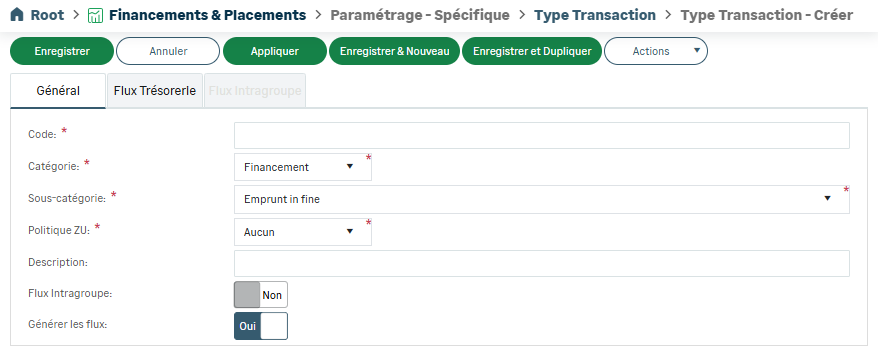
Open the Transaction Type submenu, and click the Create button. The form for a new code is displayed.
-
Complete the mandatory fields.
-
Create a Code for your transaction type.
-
Select Investment as Category and Purchase of Certificate of Deposit as Subcategory.
-
And finally, complete the fields and tabs.
-
Save your new transaction type.
-
Repeat the process to create the Sell of Certificate of Deposit transaction type for your Certificates of Deposit. In the end, both Purchase and Sell transaction types are available in the input form for Certificates of Deposit.
Input
-
To enter this financing type, select Certificate of Deposit from the Entities menu of Debts & Investments module.
The list of the potential transactions appears.
-
Click the Create button.
In the form which opens, the information to be entered is grouped in dedicated tabs.
-
Complete the tabs and save your certificate of deposit.
Important
Some tabs are specific to one instrument, you can find more details on the general tabs in the topic: Entry Guidelines.
Specifics
The platform enables you to manage the partial and total sell of your certificates of deposit.
-
From the list, select the certificate for which you want to sell shares.
-
Open the More menu and click Create Sell.
-
Complete the info and save your input to finalize the sell on the platform.
The original purchase is automatically updated with your new sell. The maturity repayment is recalculated according to the number of remaining shares, as well as the potential interests for the purchase transaction.


