Click the  button.
The calculation contextual menu appears.
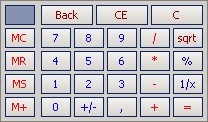
The function buttons are described below.
| Button | Description |
|---|---|
| Back | Cancels the last digit of the number |
| CE | Deletes the number |
| C | Cancels the current calculation |
| MC | Resets the memory |
| MR | Displays the memorized number |
| MS | Clears the current memory and saves the displayed number |
| M+ | Saves the displayed number added to the current memorized number |
| +/- | Inverts the sign of the displayed number (positive or negative) |
| , | Inserts the decimal separator for non-integer numbers |
| / | Division |
| * | Multiplication |
| - | Subtraction |
| + | Addition |
| sqrt | Square root |
| % |
Displays the result as a percentage Or Applies a percentage in the calculation E.g.: 200 + 50% [of 200] = 300 |
| 1/X | Calculates the additive inverse of the displayed number |
| = | Calculates the formula and displays the result Repeats the last calculation when the function is used twice |
| X | Closes the window (button in the bottom left) |


