Setting up a company grouping enables you to display later (when entering your budget) a consolidated view of the budgets of its companies. This consolidated view is the total of Operational Budgets and Treasury Budgets of companies within a same grouping.
Company groupings are elements of Sage XRT Treasury data repository. You can set them up via the Setup module.
Info
You can set up company groupings only for companies that are already set up.
 Accessing Setup Page for Company Groupings
- In the Modules Tasks pane, select the Setup module from the accordion tab.
The tasks of the module are displayed in this pane. - Select the Company groupings option in the Setup folder.
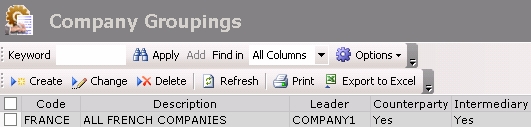
The setup page for company groupings is displayed with the list of the existing company groupings in a table.
The table shows the code and description of the company grouping in the first columns.
For more information on:
- Reorganization of the lines display in the table, click here
- how to search text in the table, click here
- how to create lines, see the topic below,
- modifying lines in the table, click here
- deleting lines in the table, click here
You can change the layout of the table: columns display, filtering on selection criteria, lines grouping according to criteria, etc. For more information on this feature, see topic Table Reorganization.
Creating Company Groupings
To create a company grouping, you need to have already set up two companies.
For more information on the creation of entities, see topic Company.
Info
This procedure only presents the fields that are useful to the Budget Management. If you want more information on the other fields, see the documentation of the Common Setup module.
- In the setup page for company groupings, click the Create button.
The General tab is displayed on the creation page. This tab enables you to save the standard information used for the unique identification of the company grouping.
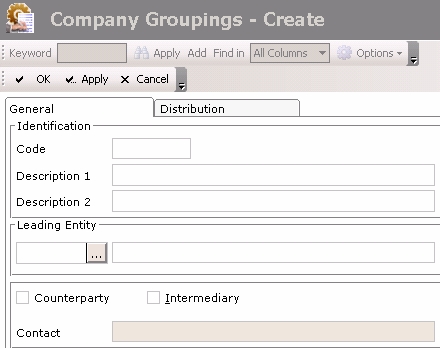
- Enter a code and a description for the company grouping in the Code and Description 1 fields.
- In the Leading Entity field, select the main company:
- Click the button
 to display the list of the set up companies.
 - In the contextual window, double-click the line to select it.
The code and name of the selected company are displayed in the General tab.
Info
The selection of the leading entity does not influence the consolidation.
- Click the Distribution tab. This tab enables the association of companies with the grouping.
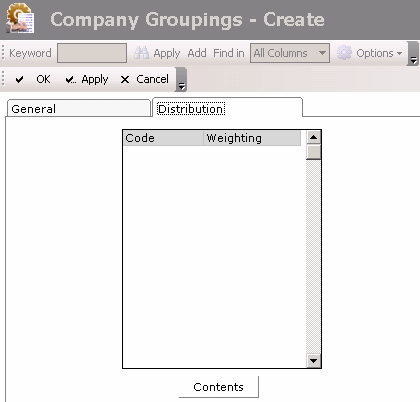
- Click the Contents button to select companies.
A contextual window displays the list of the existing companies.
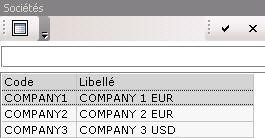
- Click a line to select it or to cancel its selection.
The check mark on the left indicates that the line is selected. - Click the button
 to validate your selection.
This selection is displayed in the General tab. - For each selected company, enter a weighting percentage in the Weighting column.
- The value for the total weighting percentage of the companies must be 100%.
Info
Weighting does not influence the consolidation.
- Click the following buttons, as needed:
- Apply to save the setup of the grouping and create another one,
- OK to save the setup of the grouping and go back to the list of the set up company groupings,
- Cancel to cancel the setup of the grouping.


