Mandate Import
You can import Mandates for their data to be automatically integrated to the platform.
Mandatory Data
A paper SEPA mandate must comprise the following elements:
-
Title: SEPA Direct Debit Mandate
-
Unique Mandate Reference: UMR
-
Creditor details
-
SEPA Creditor Identifier: CI
-
Legal mentions recapping the contract
As for the platform, paperless mandates compile these mandatory data as well as other customizable types of data.
Data Structure
The platform provides you with default structures to import your authorized mandates. They are listed into the Structures grid in the Import & Export menu of Receipts module. Their names start with DEF_MANDATE.
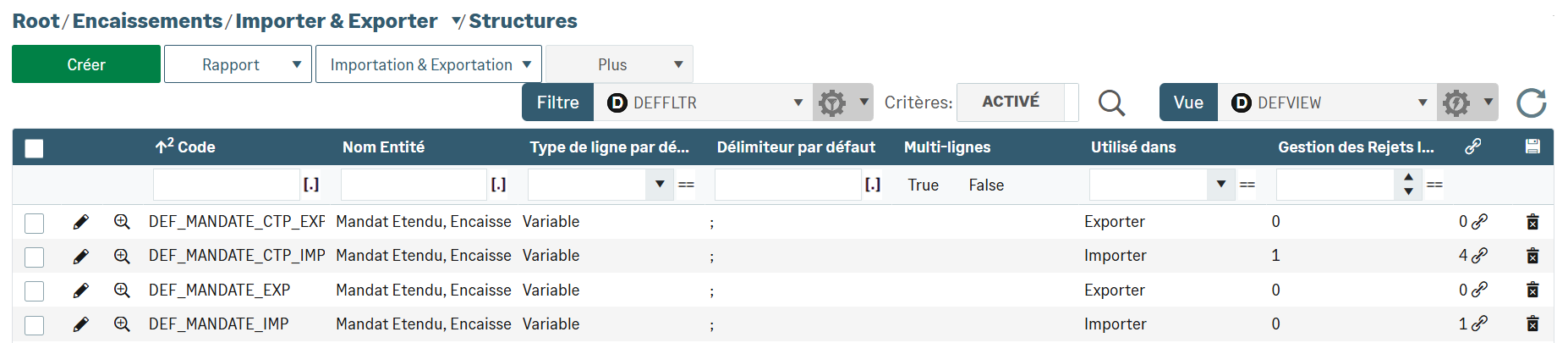
You can duplicate a default structure to modify it according to your needs. To do so, select it in the grid and click Duplicate in the Plus dropdown menu. Proceed with your customization and validate the new structure.
You can also create your own structures. For this purpose, click the Create button, and complete the form tab(s).
The files imported intoReceipts module are text files (.csv or .txt). This format enables you to import more than one mandate.
File Import
To import a mandate file, go to the Import Files submenu in the Import & Export of Receipts module.
Use the Create button which enables to select a structure and to add your file. Complete the tables and fields and save your entries.


