Fixing Dates
Fixing dates must be defined for the Variable-Rate Transactions. The fixing date is the date on which the variable interest rate is applied.
You can set it up in the creation/modification form for variable-rate Transactions in the Interests tab. The options of the Rate section can be defined after the selection of the Variable Rate Type.
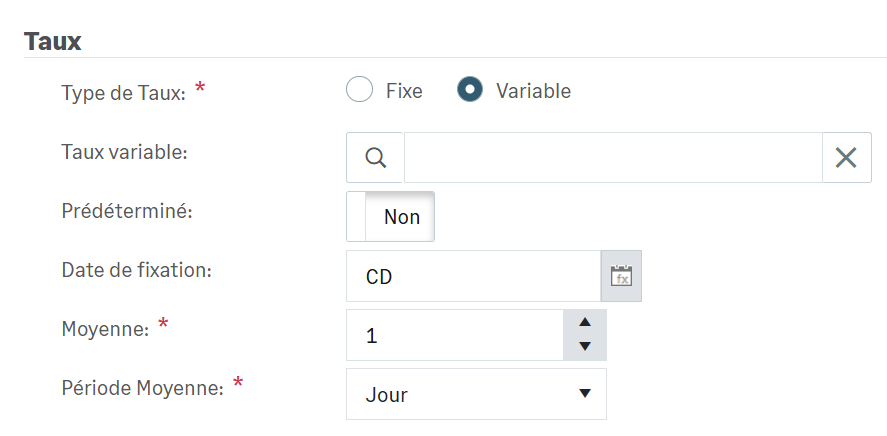
The Fixing Date field enables you to create the formula of the rolling date which will be applied from the theoretical date of the maturity. The default Fixing Date is the theoretical date.
The Average and Average Period fields enable you to use an average of the daily rates over a period to determine. The default Average field is set to 1 and the default Average Period to Day, i.e. no average.
Rolling Date
Click the Formula button, at the end of the Fixing Date field, to access the parameters of the rolling date.
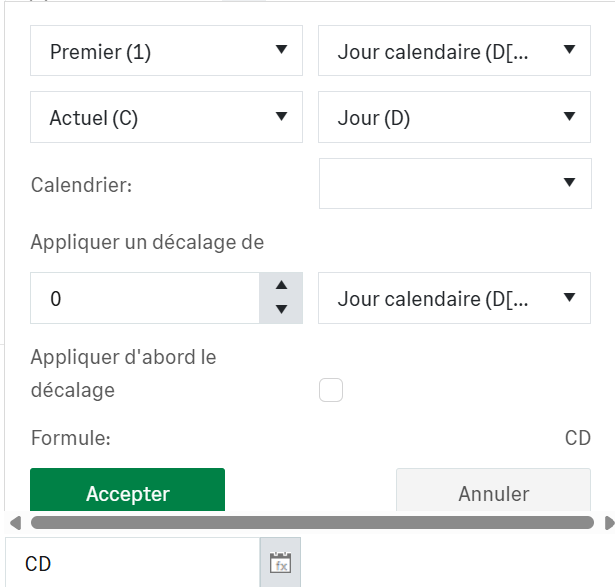
The first four lists are used to specify the deferment: no deferment, first next business day, second next business day, and so on.
In the Calendar section, you can select a calendar to apply if necessary.
In Apply time lag of, enter a number of days and select the rolling type: Calendar Day, Working Day, Business Day, Months, Years.
Info
As a reminder, business days are the days that can be legally worked as defined by the regulations in force. Business days are weekdays, Monday to Saturday inclusive. Sunday and public holidays are excluded. Legally, there are six working days per week (except public holidays).
Working days are the days when the company is actually in operation. They depend on its operating method. The working days in a company are generally from Monday to Friday inclusive, i.e. a five-day work week, although some businesses are open from Monday to Saturday inclusive. Other example: banks are usually closed on Mondays. Their working days will therefore be from Tuesday to Saturday inclusive.
Enable the Apply time lag first option if you want the number defined above to be integrated at the beginning of the calculation formula.
The result of your setting is automatically displayed in the Formula field. Click the Accept button to save your formula.
Cheat Sheet
| Rolling type | Time lag | Result | |
|---|---|---|---|
|
First (1) |
Calendar day (D[C]) |
0 |
No deferment. The rolling is applied as of the transaction date entered, i.e. with no deferment, even if the transaction date falls on a non-banking day. E.g.: Theoretical date = 10/8/2023 -> Fixing date = 10/8/2023 (even if it is Sunday) |
|
First (1) |
Business day (D[B]) |
0 |
Deferment to the next business day E.g.: Theoretical date = 10/8/2023 -> Fixing date = 10/9/2023 (deferred to Monday following Sunday 8th) E.g.: Theoretical date = 10/9/2023 -> Fixing date = 10/9/2023 (no deferment because 9th is Monday) |
|
First (1) |
Working day (D[W]) |
0 |
Deferred to the next working day E.g.: Theoretical date = 10/8/2023 -> Fixing date = 10/10/2023 (8th is Sunday, and 9th is Monday, closing day for the branch) E.g.: Theoretical date = 10/9/2023 -> Fixing date = 10/10/2023 (9th is Monday, closing day for the branch) |
|
First (1) |
Calendar day (D[C]) |
1 Calendar day
(D[C]) |
1 rolling calendar day is added to create a deferment. E.g.: Theoretical date = 10/7/2023 -> Fixing date = 10/8/2023 (even if it is Sunday) |
|
First (1) |
Business day
(D[B]) |
1 Calendar day
(D[C]) |
1 rolling calendar day is added to the deferment to the next business day. E.g.: Theoretical date = 10/8/2023 -> Fixing date = 10/10/2023 (deferred to Monday following Sunday 8th + 1 rolling calendar day) E.g.: Theoretical date = 10/9/2023 -> Fixing date = 10/10/2023 (no deferment because 9th is Monday+ 1 rolling calendar day) |


