Entering Cash Forecasts
The Cash Flow Ledger allows you to manually create forecasts for cash disbursement and receipt.
From Cash module, select Cash Flow Ledger in the Entities menu, then click Create.
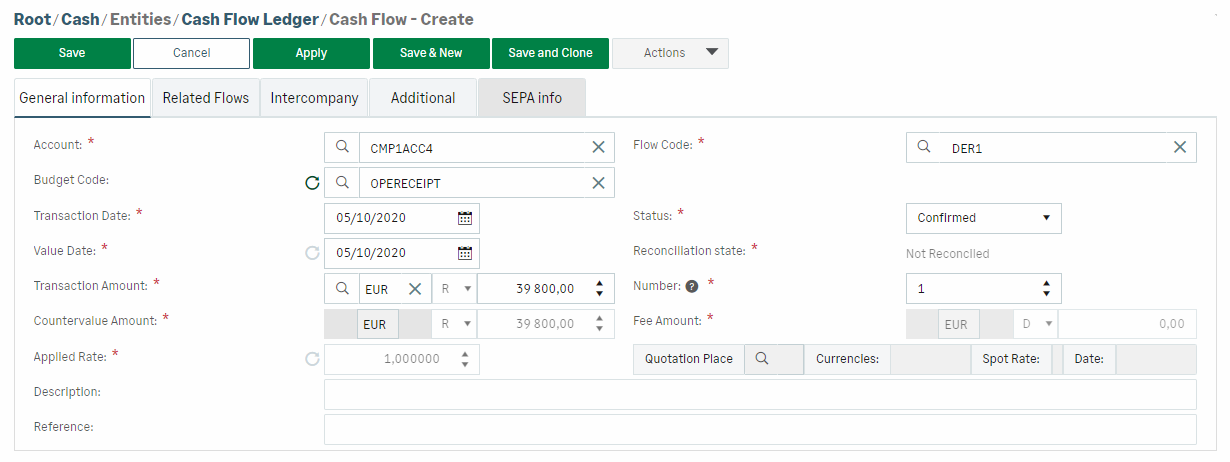
In the General Information tab of the form, select the Account and the Flow Code.
If a substitution rule is matching, the Budget Code Customizable combination of alphanumerical characters representing the assignment of flows to categories of activity. is automatically filled in.
The Value Date Date on which the transaction is taken into account in the balance. is calculated based on the value condition setting.
Select a value in the Status list: Confirmed (default), Forecast, or Actual. The Reconciliation state field is automatically filled in: Not reconciled or Reconciled for the actual data.
The Fee Amount is calculated based on the setting made for fees management.
The Countervalue Amount is calculated according to the conversion rules. If the flow is a receipt, the Ask rate is applied. If the flow is a disbursement, the Bid rate is applied.
The Applied Rate and the Quotation Place Stock exchange on which securities and currencies are bought and sold. can be edited on the fly. The Countervalue Amount is then automatically recalculated.
Click Save to validate the creation of the cash forecast.


