Budget Code Substitution Rules
When entering or importing cash flows Movement of money in and out of a company., the budget codes Customizable combination of alphanumerical characters representing the assignment of flows to categories of activity. are automatically assigned. With the optional setting of substitution rules in Sage XRT Solution, you can also assign budget codes during the reconciliation process.
From Cash module, select Budget Code Substitution Rule in the Setup - Other menu.
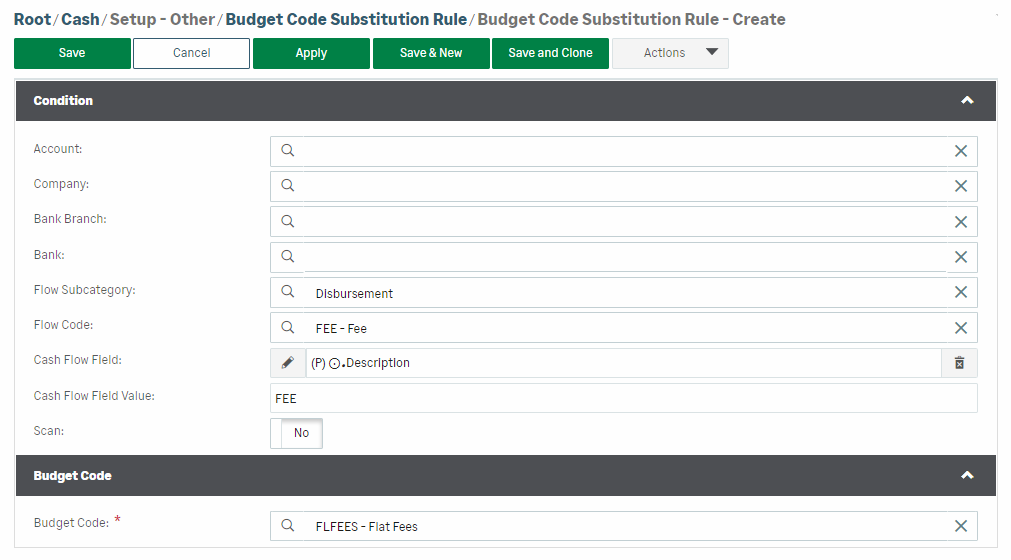
In the Condition section, you can select the entity for which you want to create a substitution rule:
-
Account
-
Company
-
Bank Branch
-
Bank
The Flow Subcategory and Flow Code fields enable you to specify which flows will be assigned a budget code during reconciliation.
In Cash Flow Field, select the property to be scanned by the reconciliation process, and in Cash Flow Field Value, select the value to be found for assigning a budget code. You can limit the search scope by using the Scan - Start Position option.
In the Budget Code section, select the code to be assigned to the flow.
Click Save to validate the creation of the substitution rule.
Examples
Bank
| BTC | Amount | Transaction date | Description |
|---|---|---|---|
| 05 | 1000.00 EUR | 01/11/2023 | Payment for SXA License |
| 05 | 2000.00 EUR | 01/11/2023 | Payment for SXA License |
| 05 | 3000.00 EUR | 01/11/2023 | Payment for Sage 100 License |
After the reconciliation process and the application of the budget code substitution rule:
Cash
| Flow | Amount | Transaction date | Description | Budget Code |
|---|---|---|---|---|
| RECVDTSF | 1000.00 EUR | 01/11/2023 | Payment for SXA License | XRT Product |
| RECVDTSF | 2000.00 EUR | 01/11/2023 | Payment for SXA License | XRT Product |
| RECVDTSF | 3000.00 EUR | 01/11/2023 | Payment for Sage 100 License | L100 Product |


